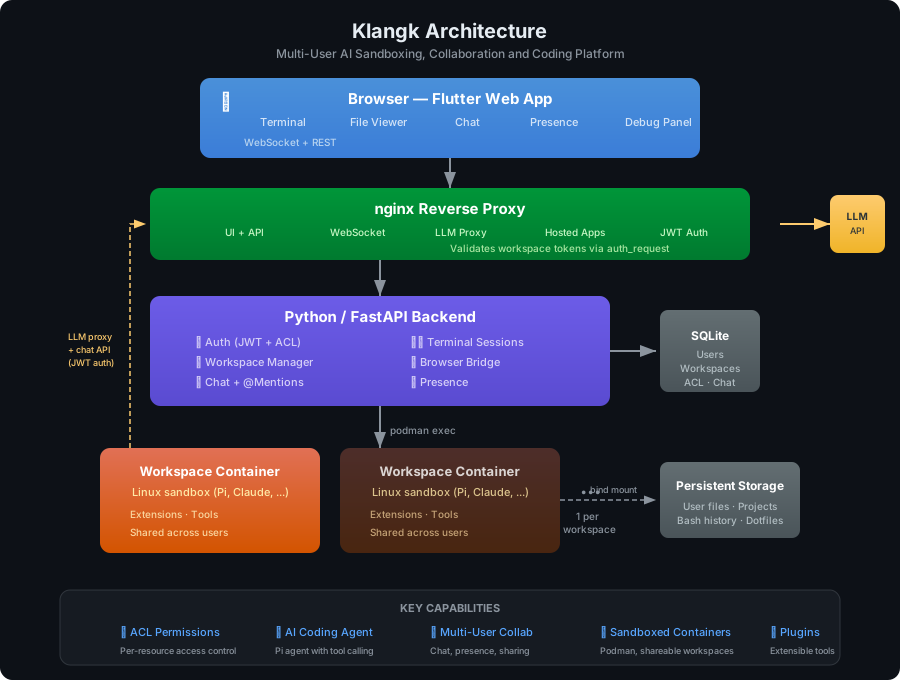
Browser (Flutter Web + Terminal + Files + Chat)
    ├── WebSocket (authenticated): terminal I/O, exec, browser bridge, chat, presence, lifecycle events
    ├── Browser delegate: handles bridge requests from Pi extensions (fetch, plugin actions)
    ├── Auto-reconnect with exponential backoff on disconnect
nginx reverse proxy (port 8995, serves UI + API + hosted app proxy + LLM proxy)
    ↕ LLM proxy: container → host.containers.internal:8995/llm-proxy/ → ${KLANGK_LLM_BASE_URL}
    ↕ auth_request: validates per-workspace JWT on container→host endpoints
    ↕
Python/FastAPI backend (port 8997, serves API + frontend static files)
    ├── Auth (JWT sessions, SQLite user store)
    ├── Workspace registry (user → [workspace] → container)
    ├── Browser bridge (/api/v1/browser-delegate → WebSocket → Flutter)
    ├── Chat (messages, @mentions, pagination, message types, container-to-chat REST API)
    ├── Presence (who's connected per workspace, join/leave broadcasts)
    ├── Terminal/exec session management
    ↕ podman exec subprocess
Pi container per workspace (interactive terminal mode)
    ├── Pi extensions (from $KLANGK_PLUGINS_DIR/*/extension.ts)
    ├── AGENTS.md (dynamically generated on container start)
    ├── /tmp/klangk/workspace-token (per-workspace JWT, auto-renewed)
    ↕ bind mount
$KLANGK_DATA_DIR/workspaces/<user-id>/home/<workspace-id>/