Architecture Overview
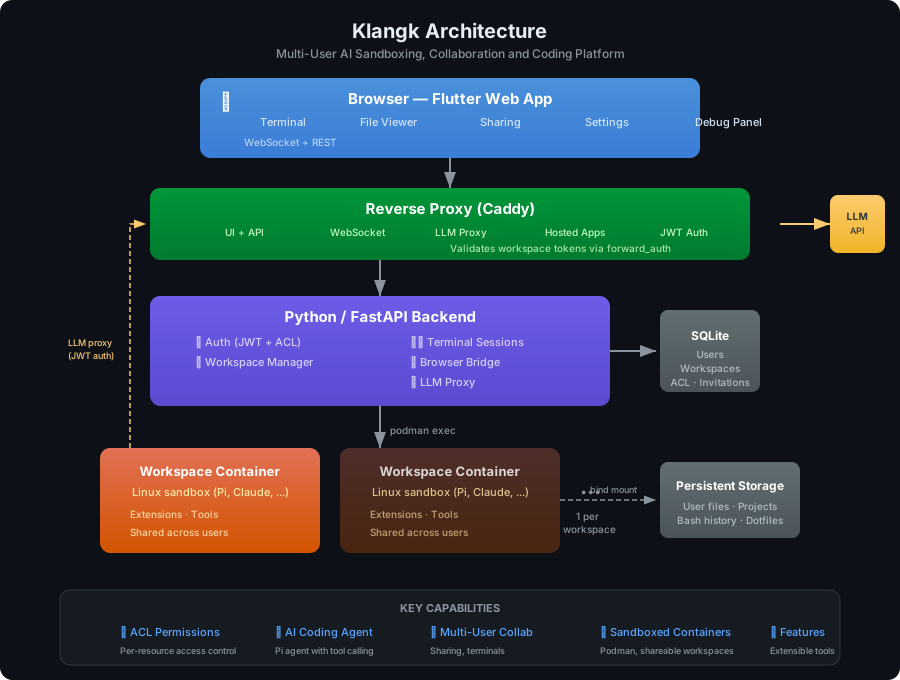
Browser (Flutter Web + Terminal + Files)
    ├── WebSocket (authenticated): terminal I/O, exec, browser bridge, lifecycle events
    ├── Browser delegate: handles bridge requests from Pi extensions (fetch, feature actions)
    ├── Auto-reconnect with exponential backoff on disconnect
reverse proxy (Caddy; browser port 8997 = UI + API + hosted app proxy; egress port 8995 = container→host endpoints)
    ↕ LLM proxy: container → host.containers.internal:8995/llm-proxy/ → klangkd (litellm.Router)
    ↕ auth_request: validates per-workspace JWT on container→host endpoints
    ↕
Python/FastAPI backend (UDS, serves API + frontend static files)
    ├── Auth (JWT sessions, SQLite user store)
    ├── Workspace registry (user → [workspace] → container)
    ├── Browser bridge (/api/v1/browser-delegate → WebSocket → Flutter)
    ├── Terminal/exec session management
    ↕ podman exec subprocess
Pi container per workspace (interactive terminal mode)
    ├── Pi extensions (from features/ in the repo, baked into the workspace image; see features.yaml)
    ├── AGENTS.md (dynamically generated on container start)
    ├── /tmp/klangk/workspace-token (per-workspace JWT, auto-renewed)
    ↕ bind mount
$KLANGKD_DATA_DIR/workspaces/<workspace-id>/home/
Components
- Package (
src/klangk/): one Python distribution shipping two top-level packages — theklangkdserver (FastAPI, single-port: API, WebSocket, frontend static files) and theklangkclient (klangkcommand, typer-based, talks to the server over HTTP + WebSocket for terminal access to containers). Onepip install klangkyields both binaries. - Frontend (
src/frontend/): Flutter Web — file viewer, debug panel - Containers (
src/containers/): Custom Dockerfile for Pi agent containers with Python3, Node.js, build-essential, SQLite, vim, emacs, network tools, Pi extensions (built and run via podman)
Data
- All data stored in
$KLANGKD_DATA_DIR(defaults to$XDG_STATE_HOME/klangkd/data, or~/.local/state/klangkd/datawhen$XDG_STATE_HOMEis unset) - SQLite database:
klangk.db(users, workspaces, groups, ACL entries, port allocations, token blocklist, login attempts, invitations) - Workspace home volume:
workspaces/<workspace-id>/home/(mounted as/home— the shared homeklangk/under the default shared layout, per-member.users/<user-id>/+/home/<handle>symlinks under per-handle) - Database persists across restarts and rebuilds