First run
The installation process has resulted in a running msksd systemd user
service.
To see status and log output, from the account the daemon runs as (the service is a systemd user unit, lingered so it survives logout):
When msksd is first started, it creates a state dir
(~/.local/state/msksd). The msksd.yaml config file is generated within it
as a commented template (see Configuration).
The unix listener binds $XDG_RUNTIME_DIR/msks/msksd.sock. Same-host clients
connect through it on peer-credential authentication. A remote can, if
configured, contact a TLS/https listener with a bearer token, but it is not
configured by default.
With the host prepared, the service lingered, and an image imported, invoking
the msks (the client) on the same account will find the socket.
The identity file
Every workspace msks uses your public ssh key as the workspace's operator identity.
Every msks ssh and msks rsync session uses your private half.
msks also allows you to manage secrets for workspaces. The same ssh key
locks workspace secrets on the daemon: values a workspace needs at runtime are
sealed under the identity, and the client unlocks them with the private half
again.
Thus, you need to configure an ssh key before msksd/msks will work properly.
The client names the key in its YAML file
(~/.config/msks/msks.yaml) or its environment, with two keys:
identity_file: ~/.ssh/id_ed25519 # the private half, read in place
pubkey_file: ~/.ssh/id_ed25519.pub # the public half alone
If your identity is in your ssh agent, you needn't specify the identity-file,
just the pubkey_file.
identity_file: the private half
identity_file names your private key file, read in place. msks derives the
public half from it at create, and the key file is never copied into msks's
state
But session resolution consults your own ssh-agent first. When SSH_AUTH_SOCK
names a live agent holding that key, every session signs through the agent and
the file's encryption stops mattering. The match is on key material, so the
file it came from and its name do not matter (ssh-add it). If your key is
saved in your ssh-agent, you needn't name the private half of your key in msks
config, only the public one (pubkey_file), and the private half need not be
on disk.
If your ssh key is not already in an agent, a key no agent holds is staged
in memory as an unencrypted OpenSSH-format key (ed25519, ecdsa
P-256/P-384/P-521, or rsa); msks never types a passphrase. An encrypted key
no agent holds is refused with a line naming ssh-add as the first fix, then
decrypting a copy, then --pubkey at create. An agent that asks for
confirmation per signature (a hardware token's touch) asks at its own cadence:
the first-boot probe's retries and the session each count as a signing request.
A passphrase-encrypted identity_file raises the session's one passphrase
prompt when the daemon's locked secret rows need it. The TUI asks once when the
tree opens, and the answer unlocks every locked row for the session. Escape or
Cancel leaves the rows locked; they stay named on the secrets page and
re-askable there.
pubkey_file: the public half alone
pubkey_file names a .pub file, and a create with it set plants that one
line as the workspace's identity and reads no private material at all. This is
the form for a key you keep encrypted on disk: the public half sits in the
.pub file while the private half answers from your agent.
The requirement: your ssh-agent holds the actual key. msks sshand
msks rsync on such a workspace authenticate through SSH_AUTH_SOCK's
agent, so ssh-add the key in the shell you run msks from. An agent holding
the key makes the sessions work with the private half never read from disk.
A shell whose agent does not hold it leaves the workspace's key auth without
an answer, and msks ssh exits with a line saying the identity resolves
nowhere. The console route still works.
Where the private half lives at runtime
An agent-held key stays in the agent: msks asks it to sign, and the file on
disk is never opened. A key msks stages itself runs in a transient in-process
agent that dies with the session. And a session you forward your agent into
(ssh_options with -A) carries the agent you named into the workspace. The
workspace identity msks mints stays separate, and your keys arrive only where
you forwarded them.
With neither key naming a usable source, msks create refuses
with a line saying so; it is the one command that needs the
identity at its start.
Importing a guest VM image
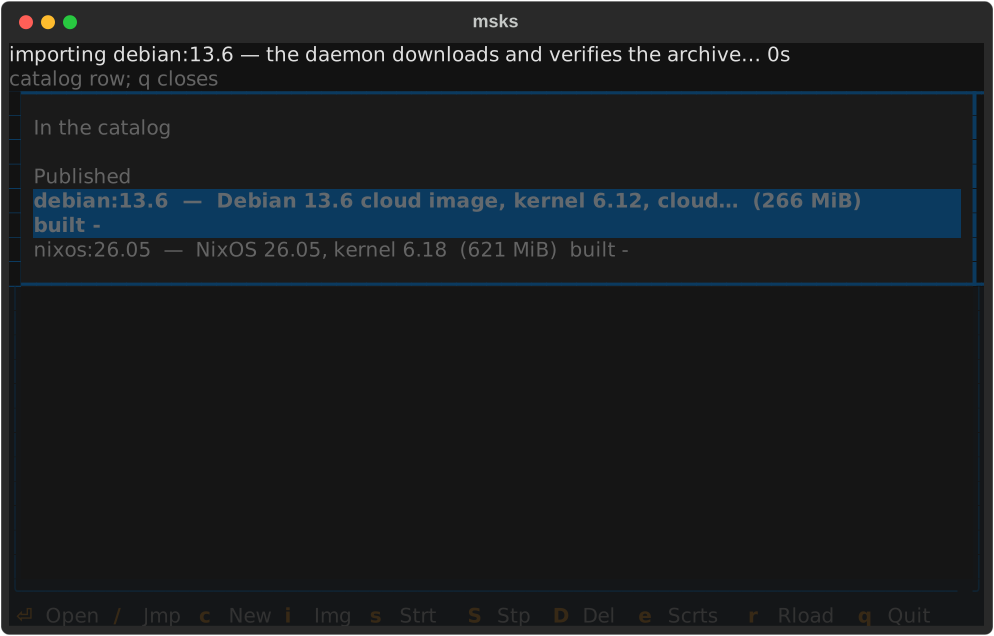
On first run, a workspace image has not been imported, so you are not able to
create guest VMs. A workspace image arrives either from the published channel
(msks image import in the TUI, or the images chapter's
URL form) or from a local build.
These images are hosted on github, and the TUI enumerates them for you and allows you to import one. There are currently Debian and NixOS guest images corresponding with the most recent msks release.